Wazuh Mobile Agent
A real Wazuh agent for Android — the same enrollment handshake and encrypted transport a laptop uses, plus device‑posture and security collectors built for a phone.
Not a syslog forwarder
Most "mobile SIEM agents" just tail a log file and ship lines over HTTP. This one enrolls the way an actual Wazuh endpoint does: a TLS handshake to authd on port 1515, then Wazuh's own encrypted transport to remoted on port 1514 — AES‑256‑CBC, validated byte‑for‑byte against a live manager. Your phone shows up in the same Agents list as every other endpoint, because as far as the manager's concerned, it is one.
A syslog‑forwarding fallback exists for managers or networks where the full wire protocol isn't reachable.
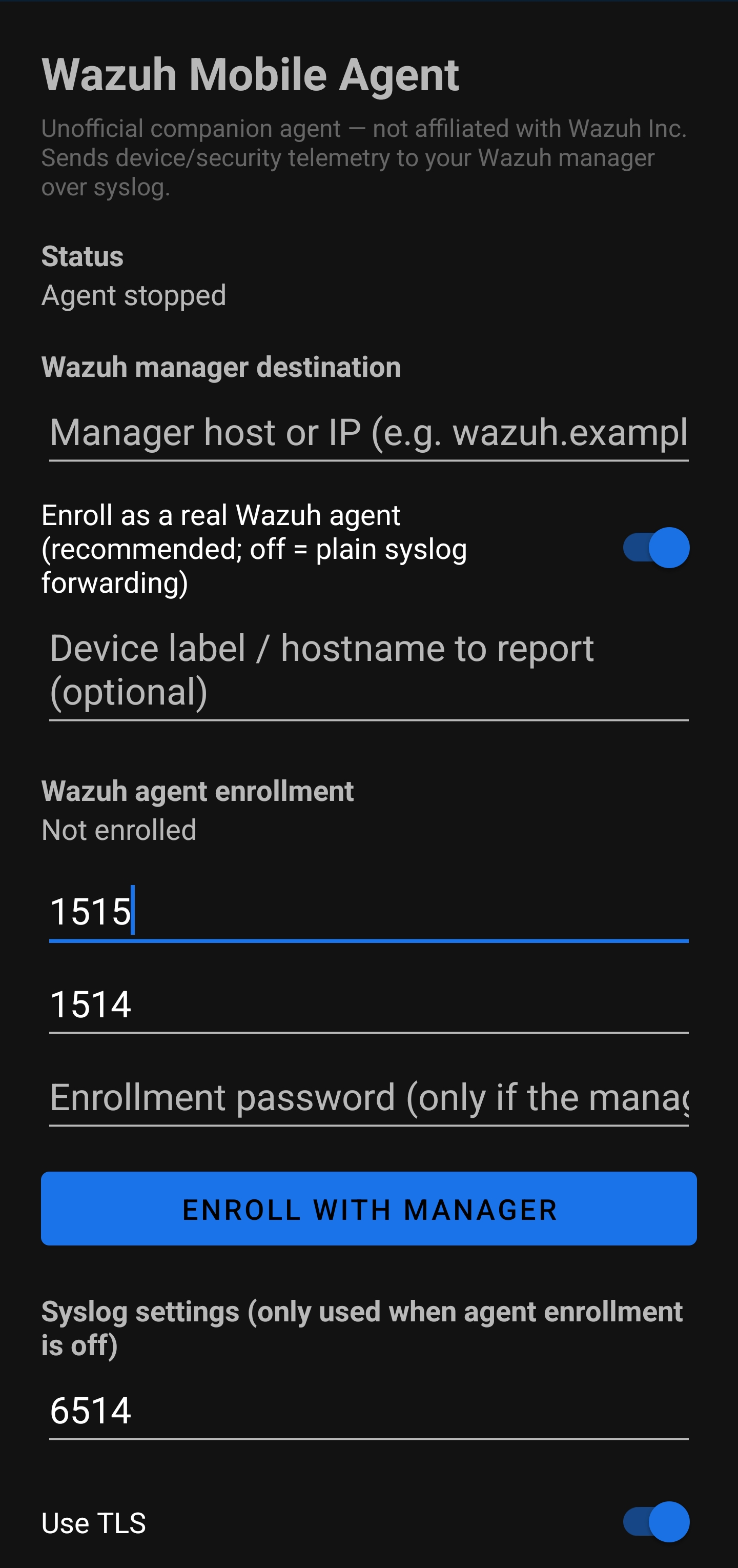
The main screen, on an actual test device — enter your manager's address, tap Enroll with Manager, and the phone shows up in your Agents list.
What it watches — on your terms
Every category below is off by default and toggled independently in Settings. Nothing is collected until you turn it on.
Device & security posture
OS version, patch level, encryption and lock‑screen state, root indicators.
Installed‑app inventory
Package list with delta tracking — flags new installs, especially from outside the Play Store.
Network & battery transitions
Connectivity and power‑state changes, for anomaly context rather than continuous tracking.
On‑device YARA scanning
Runs YARA rules locally against installed packages; matches are reported as agent events.
Notification metadata
Opt‑in only — off unless explicitly enabled, separate from every other toggle.
Live Log
An in‑app view of exactly what the agent is sending, in real time — nothing is a black box.
Full system log
Every app's logcat output, not just this one's. Off by default and can't be granted from a dialog — see setup below.
A built-in screen that asks Claude to read your manager's logs
This one really is in the app: a third screen, separate from Live Log, called AI Analysis. On demand — nothing runs automatically — it authenticates to your Wazuh manager's REST API, pulls the most recent entries from the manager's own log, and sends them in a single request to Claude's Messages API for a plain‑language security report, shown right there on the phone.
Reads the manager's own log
Recent /manager/logs entries — the manager's operational log, not the separate Indexer's alert history.
A defined analyst brief
Claude is instructed to report manager health, security‑relevant findings, patterns worth attention, and next steps — grounded strictly in what's actually in the log, nothing invented.
Your own Claude API key
You supply it, and your account is billed directly for the calls it makes — nothing is bundled or proxied through this project.
Stored on‑device only
The Wazuh API password and Claude key live in encrypted local storage — never bundled into the APK, never sent anywhere but Anthropic's API.
ClaudeClient.kt and AiAnalysisActivity.kt.Full system log — opt-in, ADB-only
Every collector above uses ordinary Android permissions. This one is different: it reads logcat — the system log every app on the device writes to, not just this one. Android deliberately keeps that out of the normal runtime‑permission dialog; the only way to grant it is a one‑time adb command from a computer.
-
Install platform-tools
Download Android SDK Platform-Tools from Google for your OS and unzip it — that's where
adblives; no full Android Studio install needed. -
Enable USB debugging on the phone
Settings → About phone → tap Build number seven times to unlock Developer Options, then Settings → Developer options → enable USB debugging.
-
Connect and authorize
Plug the phone into the computer over USB and run
adb devices. The phone shows an "Allow USB debugging?" prompt the first time — accept it, then runadb devicesagain and confirm the device is listed. -
Grant READ_LOGS
With the app already installed, run:
adb shell pm grant org.wazuh.androidagent android.permission.READ_LOGS -
Turn on the switch
Open the app → the Full system log (advanced) section near the bottom of Settings → confirm it now reads permission: granted → enable Collect full system log.
Builds
| Build | Size | Use | |
|---|---|---|---|
| Release (full) | 5.3 MB | Everything, including on‑device YARA scanning | download → |
| Release (lite) | 5.3 MB | Same app, no YARA scanning — why you'd want this → | download → |
| Release (core) | 5.3 MB | No YARA scanning and no AI Analysis screen — the smallest, most auditable build | download → |
| Debug | 7.7 MB | Verbose logging, troubleshooting | not published here |
frida-gadget, com.metasploit.stage, the EICAR test string) that some antivirus/EDR tools flag the APK itself over, independent of anything the app does. The lite and core builds remove that file entirely — not just the feature that reads it — so those specific strings aren't in the APK at all. See Antivirus false positives → for the full picture.AiAnalysisActivity/ClaudeClient/WazuhApiClient classes and the screen's manifest entry are entirely absent from the compiled app. There's no code path in this build capable of ever contacting Anthropic's API, dormant or otherwise, and nothing running on‑device to scan installed apps either. Same core Wazuh agent (enrollment, encrypted transport, device/security collectors) as the other two builds.SHA‑256 of each published APK, for anyone who wants to verify the file before installing it:
| Build | SHA‑256 |
|---|---|
| full | ceb77cc326f3cacb351a92dfed31d4129f7b132fe64e6e943c2a8d4475ad6f39 |
| lite | 0809c11cbf70efa4540cf33af0513dcf1f99adfeb2d491888bc65c7a979d587a |
| core | 8c9ece265a1fd37c7263ad948a6b9e9c24bd85d58f5a96f5b59c24dadef0ec2d |
Getting it onto a phone
-
Allow the install source
Settings → Apps → the browser you download with → Install unknown apps → allow. Android blocks sideloaded APKs by default until this is set, per app.
-
Download the APK
Open the download link above on the phone itself, or transfer the file over from another device.
-
Install
Open the downloaded file, tap Install. No collectors are enabled at this point — installing the app grants it nothing on its own.
-
Enroll against a manager
Open the app → Settings → enter your Wazuh manager's address and enrollment port
1515. Wazuh'sauthduses a self‑signed certificate by default, so the app's default strict validation fails the TLS handshake before enrollment ever starts.The correct fix is pinning the manager's real cert rather than disabling validation: pull it straight off the port and paste it into Settings → Custom CA.
Step A — on a computer (not the phone: this needs a terminal withopenssland network access to your manager — a laptop/desktop on the same network works; the phone itself can't run this unless you've installed something like Termux):openssl s_client -connect <manager-host>:1515 -showcerts </dev/null 2>/dev/null \ | awk '/-----BEGIN CERTIFICATE-----/,/-----END CERTIFICATE-----/'
Step B — on the phone: take what that command printed (not the command itself) and paste it into the app's Custom CA field. It looks like this, always starting and ending with those exact marker lines:
-----BEGIN CERTIFICATE-----
MIIDLzCCAheg...(many lines of random-looking letters/numbers)...IJsJ
-----END CERTIFICATE-----
Leave Trust all certificates off, then tap Enroll. If the cert ever rotates on the manager, re‑pull and re‑paste. Toggling Trust all certificates instead skips validation entirely — quicker, but only appropriate for a throwaway lab manager.
Getting a certificate error right after pasting the actual certificate block? Builds from before v0.1.1 could reject an otherwise‑correct paste if your clipboard path collapsed the line breaks — fixed in the current release on the download page below; if you're already on it, re‑copy carefully and make sure the
BEGIN/END CERTIFICATElines each stayed on their own line. -
Turn on the collectors you want
Back in Settings, enable whichever categories apply. Check Live Log to confirm data is actually flowing.